Trial version of Start11

I downloaded Start11 for evaluation and there were a variety of things that didn't work.  First, I couldn't add anything to the taskbar.  I created a simple shortcut on my desktop to Excel.  I opened Start11 configuration > Taskbar pins, clicked "Pin file" selected this shortcut and nothing happened.  Second, I'm using Windows Pro style start menu and tried to add a simple link to multiple files.  e.g. Documentation link then link in the menu to Visual Studio, Visual Studio Code, some documentation, some admin stuff, etc; all in various folders on my PC.  Apparently this isn't available.  I couldn't get this to work by pinning a folder menu either.  Third, when I placed the start menu icon back into the middle via Windows settings the icon moved to the middle then right back to the left edge.  What I was thinking was to have on the left side of the start menu custom things (quick stuff) and on the right side opened applications.

Anyway, is my trial version restricted in any way to prevent the obvious, to me anyway?  Thanks,

104 views 5 replies
Reply #1 Top

What version does the about page say on it?

Reply #3 Top

Hello,
Sorry to hear you are having issues. The trial should work full features, only it is time limited. Perhaps, it was not properly installed. Please try, uninstall Start11, reboot immediately (important), download latest version available in your account product download page: https://store.stardock.com/myaccount/products. Install it, reboot immediately again. Retest it and report back.

Thank you,
Basj,
Stardock Community Assistant.

Reply #4 Top

Here is what I did...

  1. Logged iito my Account.
  2. No registration found page.
  3. Went to products: Start11 for Home.
  4. Downloaded [Try Free]. Had to click the link to download.
  5. Saved "Start11v2_Setup.exe".
  6. Double-clicked this setup executable.
  7. Rebooted.
  8. All previous work was retained (thanks!).
  9. Created Excel shortcut on desktop.
  10. Pinned to Start (there was no option to pin to taskbar).
  11. Taskbar pins "Pin File" - tried and nothing happened.
  12. Tried to set the start icon to the middle - it went right back to the left.

So, I'm not sure what is going on but this isn't what I was hoping for.  What I really wanted was a taskbar I could assign a few often used icons (couple of browsers, file explorer, email client, etc) then in Start have some menus like "Development" where I can assign files like VS Code, documentation, a database, etc.  Pretty simple.  :-(

If Start11 can work for my simple needs I would like to know how.  Thanks,

Reply #5 Top

Perhaps, you just not fully familiar with Start11v2 yet.

Quoting Bill_H, reply 4148959

Pinned to Start (there was no option to pin to taskbar).

End of Bill_H's quote

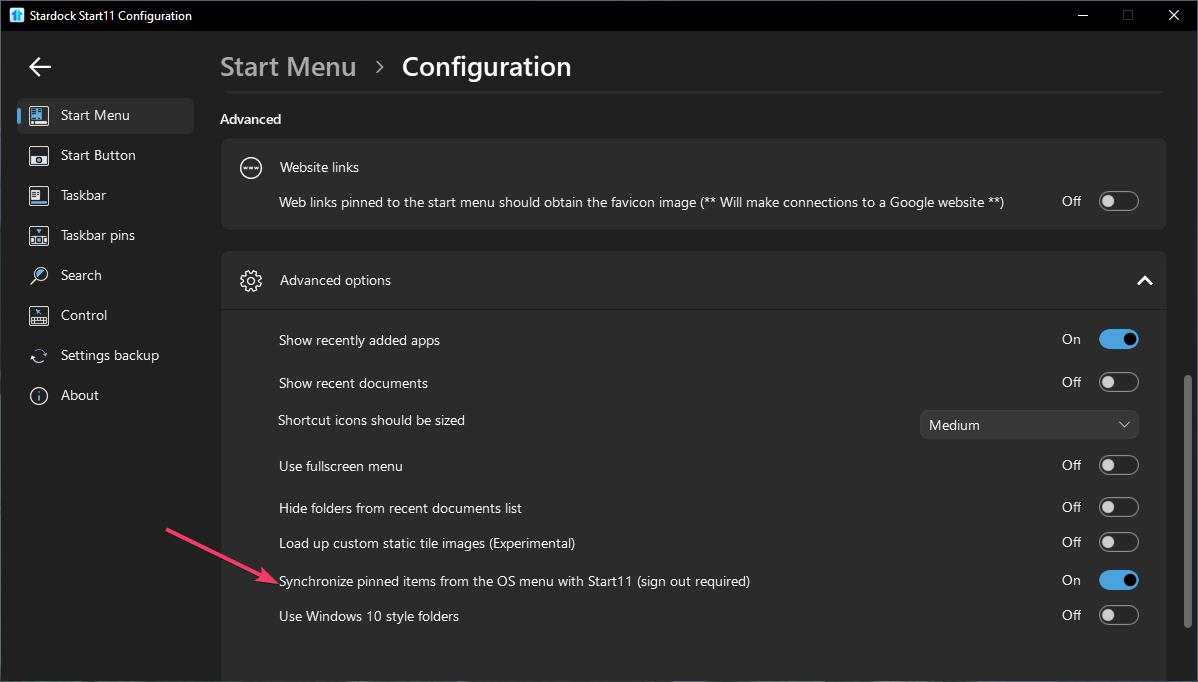
That is pin to Windows Start panel, you need the Pin to Start11 to work for Start11 directly or you need to turn on Sync pinned items: refer to my screenshot below.


Quoting Bill_H, reply 4148959

Tried to set the start icon to the middle - it went right back to the left.

End of Bill_H's quote

Need to know, you're using Windows own Start button control or Start11 Start button control on this one?

Also, we need to know your Windows 11 full version and OS Build number. Please use Winver.exe to get this numbers.


Thank you,

Basj,
Stardock Community Assistant.