Issue with dark top glass area in vista skin
 Stardock Forums
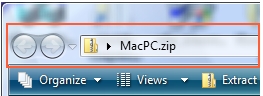
I've recently been using a skin titled BetterVistaAeroX. I wanted to remove the darkening effect applied to the window frames when entering a maximized state. I was only partially successful. In my edit, the window frames now keep their translucent appearance, but the explorer area, pictured below and outlined in red, does not. The "maximized caption" setting in Skin Studio only seems to effect window frames and not the "top glass area" section of the explorer, but as someone that is extremely inexperienced using Skin Studio, I can't determine what is controlling the darkening effect for the explorer in the maximized state. It looks like it might have something to do with the .tga image itself having a baked-in black strip for darkening the window when maximized (?). Any help on this front would be greatly appreciated. Here is the unedited BetterVistaAeroX skin.