


[Bug Report] Korean localization in context menu displays Japanese text (Fences 6 / 7)
 Stardock Forums
Windows Version Number: Windows 11 26H2 26300.9974
App Version: 7.0
Hello Stardock Team,
I would like to report a localization bug in Fences 6 and Fences 7.
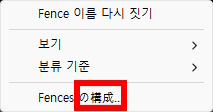
When the system or Fences language is set to Korean (ko-KR), some items in the desktop right-click context menu are incorrectly displayed in Japanese instead of Korean.
Environment Details:
• Fences Version: [Fences 7.0 / Fences 6.4.6.1] (Standalone version purchased directly from Stardock)
• OS Version: [Windows 11 26H2 (Korean)]
Issue Description:
• Expected behavior: All Fences context menu items should be displayed in Korean.
• Actual behavior: Specific context menu entries are showing up in Japanese (please refer to the attached screenshot).
It appears that the Japanese string resources are mistakenly mapped to the Korean locale in the shell extension module. Could you please look into this and fix the Korean translation mapping in an upcoming update?
Thank you!