Groupy Performance Issue with Valorant
 Stardock Forums
Windows Version Number: Windows 11 26H2 (26300.9711)
App Version: 2.31
I've been using Groupy for years without any issues. However, starting a few months ago, I began experiencing severe FPS drops whenever I played VALORANT with Groupy running.
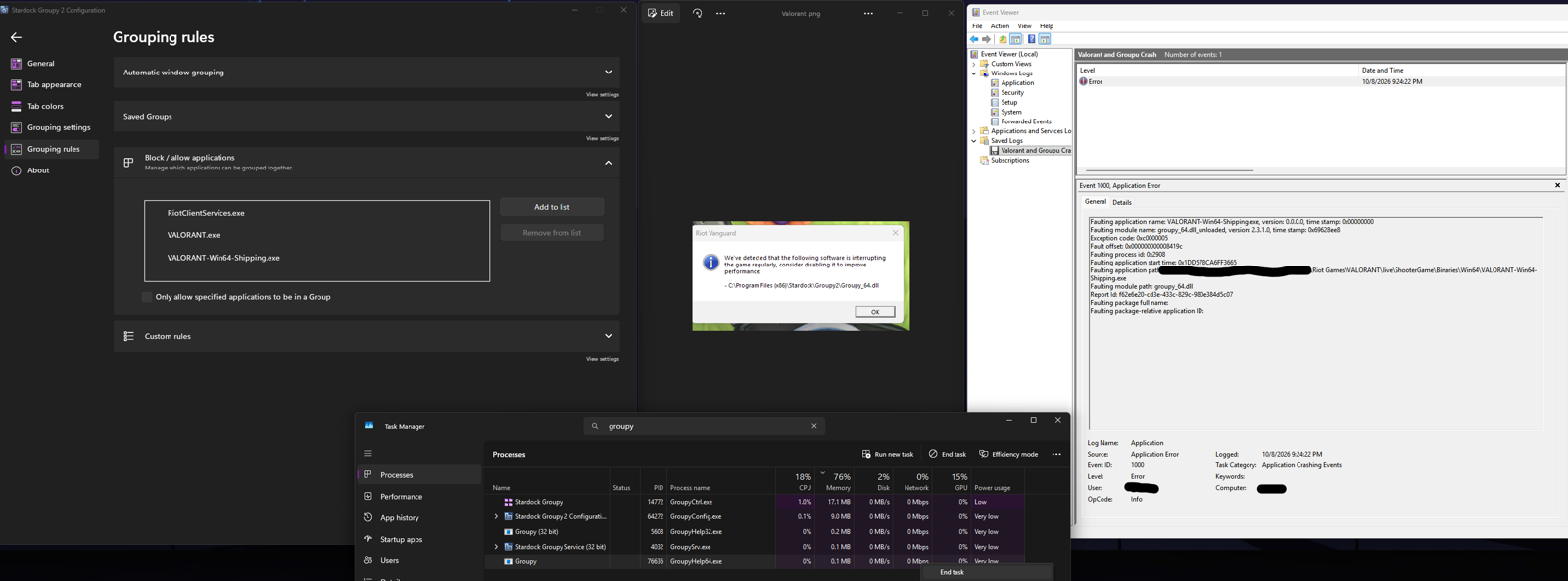
The issue is specifically related to GroupyHelp64.exe. When the process is running, my FPS drops from 1,000+ to approximately 200. As soon as I terminate GroupyHelp64.exe through Task Manager, my FPS immediately returns to normal.
I've attached screenshots showing the in-game notification identifying Groupy as the source of the issue, as well as the relevant Windows Event Viewer information.
I've also tried blacklisting all of VALORANT's game directories in Groupy's settings, but this did not resolve the problem.
Current workaround:
Every time I want to play VALORANT, I have to open Task Manager and manually terminate GroupyHelp64.exe while leaving the other Groupy processes running. This immediately restores normal game performance.
What's particularly strange is that this setup worked perfectly fine for years before the issue started.
Since then, I've even performed a clean Windows reinstall, so I'm confident this isn't an issue with my Windows installation.
Is there a way to permanently resolve this issue? It seems like there may be a compatibility bug with Groupy and VALORANT, specifically involving GroupyHelp64.exe. I'd appreciate any suggestions or insight from the developers or anyone experiencing the same problem.