Share your Start Menu pages on Wincustomize

Start11 v3 introduces new ways to share your Start layouts


For as long as WinCustomize has been around, the best part of the site has never really been the files, it's the community. Somebody posts a desktop, someone else asks how they did the taskbar, and a week later there are five versions of it in the gallery. That back and forth is a big part of why this place has lasted 25 years.

With Start11 v3, which is out today, we wanted to bring some of that into the Start menu itself. The big addition this time is widgets. There are more than 20 of them, including calendars, clocks, notes and system monitoring. Once you start putting widgets on a Start menu page, you end up building something pretty personal (and something you'll spend way too long tweaking). It seemed like a waste for all that work to live on one PC.

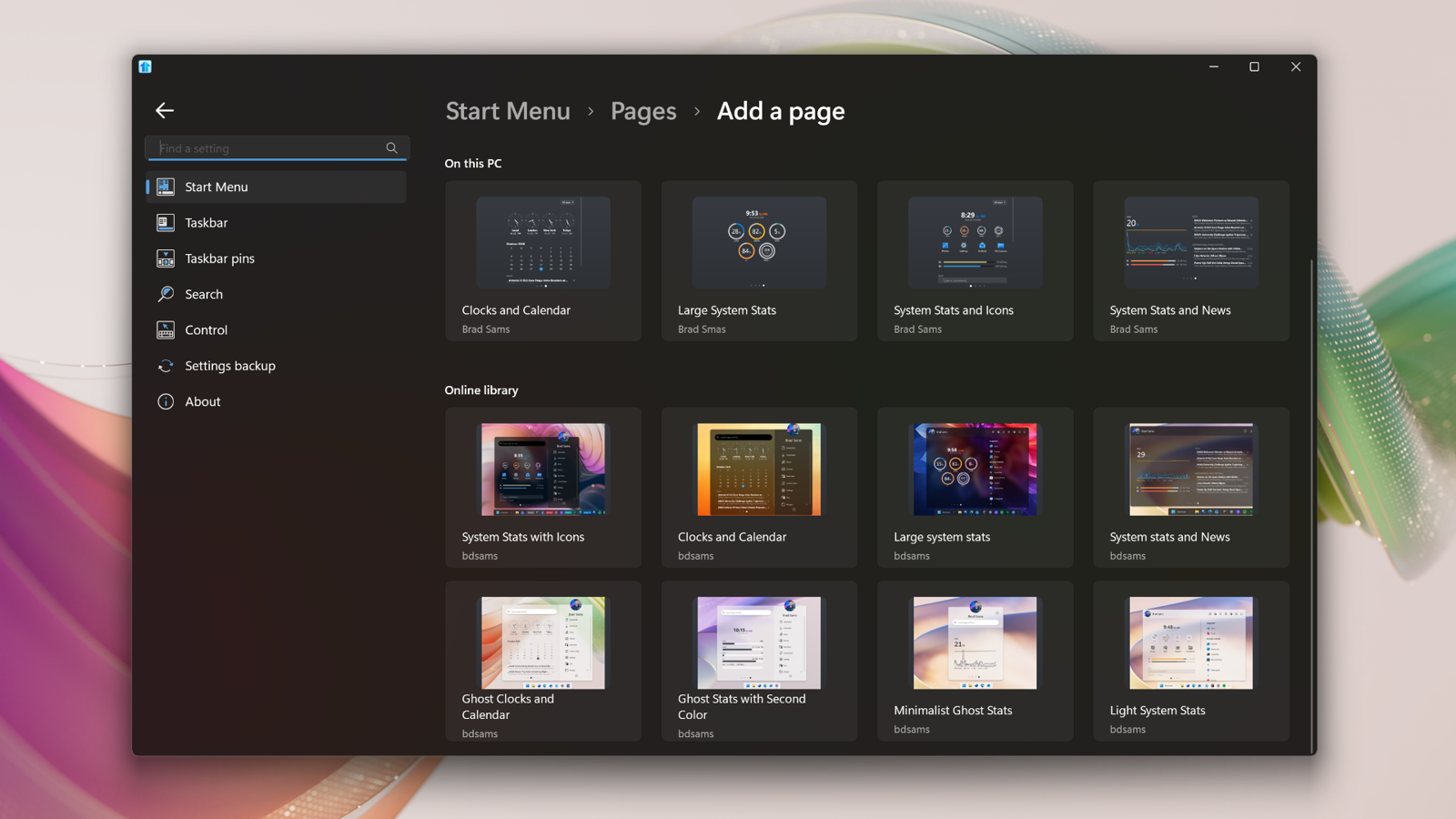
So Start11 v3 lets you share your Start menu pages and browse pages other people have made, right from inside the app. If you go to Start menu, then Pages, then Add a page, you'll see an Online library below your own pages. You can add any page you like from there without having to go find a file and import it.
Those pages also have their own section here on WinCustomize, so you can browse them on the web too. Keep in mind that we are only exporting the configuration of the pages, and not the apps or everything associated with the Start menu configuration.

We intend to expand the functionality of these exports but need to balance the ability to share configurations with importing them safely too. Some of these pages can get complex with applications and layouts, so the first steps are make the base contents shareable and build from there based on your feedback. 

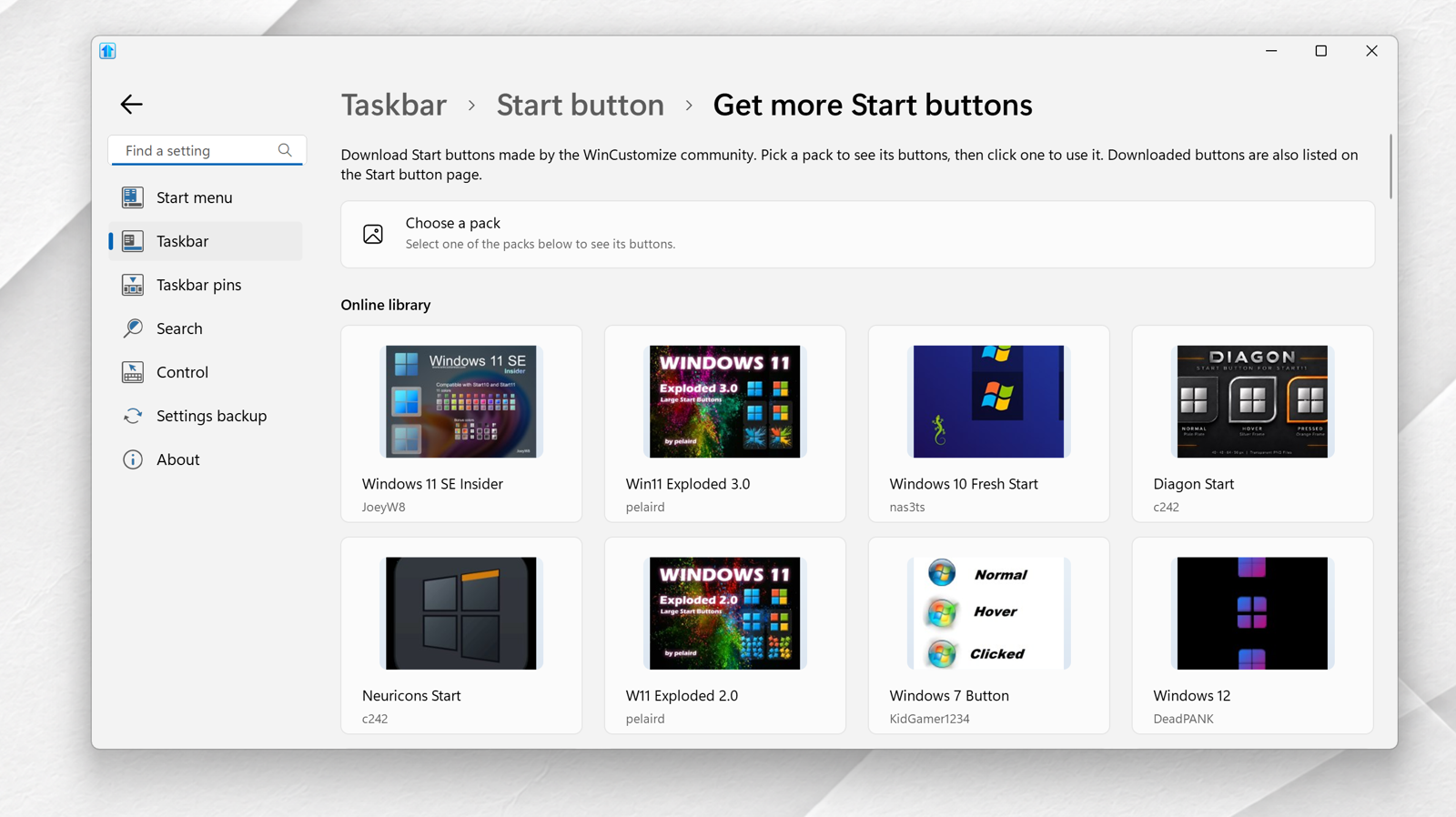
While you're in there, Start11 v3 also lets you browse thousands of Start button designs from inside the app, which is a nice way to finish off a new layout. Start11 v3 is available now for $8 during the release preview (it's normally $10), and it's included in Object Desktop if you already have that. 


426 views 14 replies
Reply #1 Top

I have V2. Can I upgrade to V3? Will it be free?

Reply #2 Top
Quoting Chasbo, reply 4149456

I have V2. Can I upgrade to V3? Will it be free?

End of Chasbo's quote

You can upgrade but unless it was purchased very recently it will be a small upgrade fee.

You are not required to update though, v2 (and even v1) continues to get support and in fact should have a beta update tomorrow to work around some upcoming OS changes.  Upgrade to v3 only if you think the features are worth it to you or you want to support development.

Reply #3 Top

thanks for the quick reply Neil

Reply #4 Top

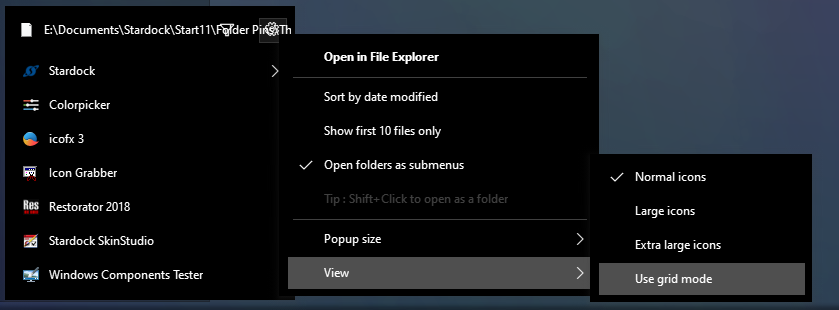
With V3, the new folder popup options are nice but I would like if we could have an option to hide this part of the menu like how it was in v2.

Also would be nice if each folder popup had their own options respected. If I select the grid option, all popups use the same option. (It only works if you have them pinned to the taskbar. If I create a desktop shortcut to put on a dock like objectdock or winstep, it just sets grid on everything.)

Reply #5 Top

Frogboy was right about "supercharging the WC Gallery."

B) :thumbsup:  

Reply #6 Top

So my deleted question finally answers. ;P :-" 

Reply #7 Top
Quoting SimplexDesigns, reply 4149490

With V3, the new folder popup options are nice but I would like if we could have an option to hide this part of the menu like how it was in v2.

Also would be nice if each folder popup had their own options respected. If I select the grid option, all popups use the same option. (It only works if you have them pinned to the taskbar. If I create a desktop shortcut to put on a dock like objectdock or winstep, it just sets grid on everything.)

End of SimplexDesigns's quote

How are you accessing them from anywhere other than the taskbar?  The settings should be being saved per folder.

With regards to that header, the next update will have an autohide option you can pick (under view submenu) on each so you can decide if you want to see the header always or only if you mouseover it.

Reply #8 Top
Quoting Neil, reply 4149501
Quoting SimplexDesigns, reply 4149490

With V3, the new folder popup options are nice but I would like if we could have an option to hide this part of the menu like how it was in v2.

Also would be nice if each folder popup had their own options respected. If I select the grid option, all popups use the same option. (It only works if you have them pinned to the taskbar. If I create a desktop shortcut to put on a dock like objectdock or winstep, it just sets grid on everything.)

End of SimplexDesigns's quote

How are you accessing them from anywhere other than the taskbar?  The settings should be being saved per folder.

With regards to that header, the next update will have an autohide option you can pick (under view submenu) on each so you can decide if you want to see the header always or only if you mouseover it.

End of Neil's quote

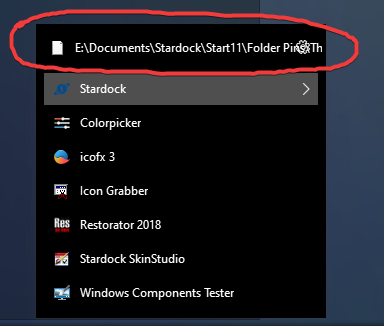
If you create a windows shortcut that links to "C:\Program Files (x86)\Stardock\Start11\PinMenu.exe"

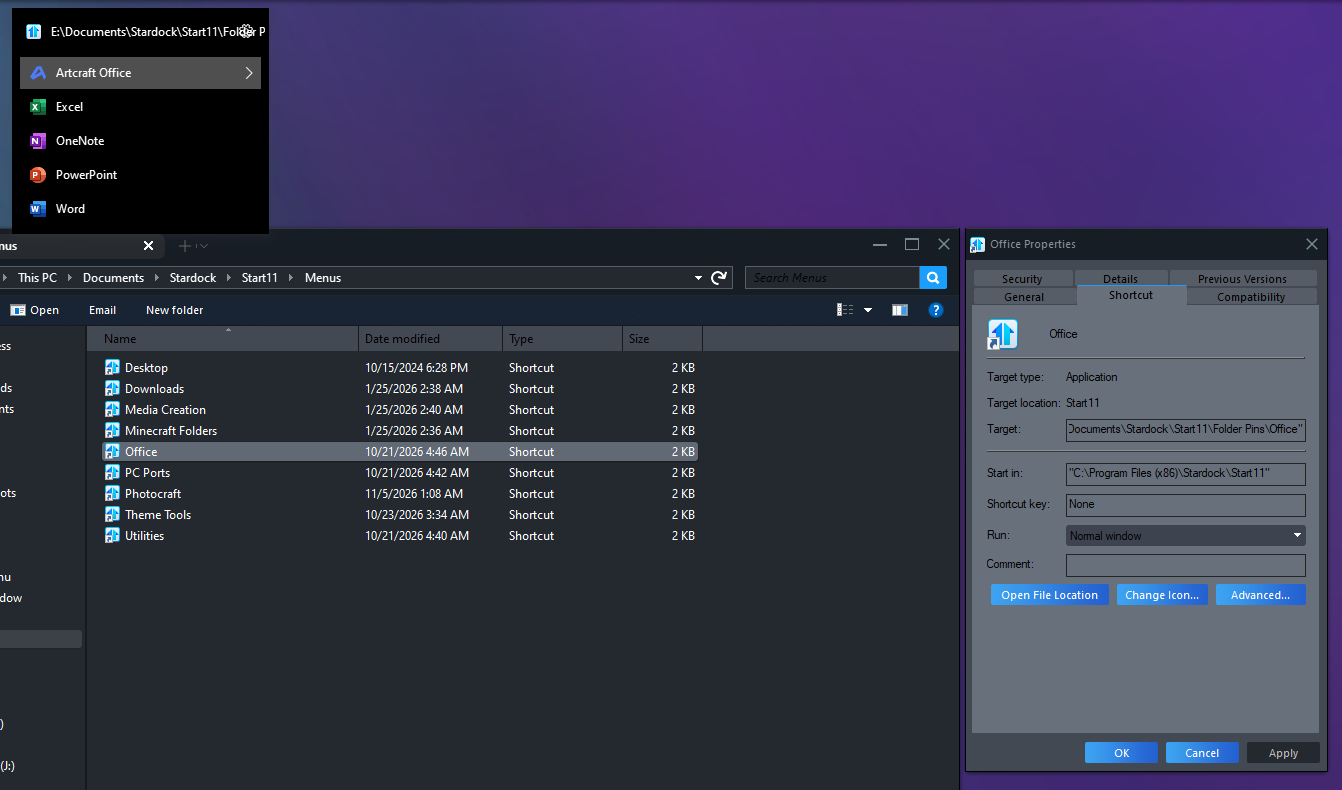
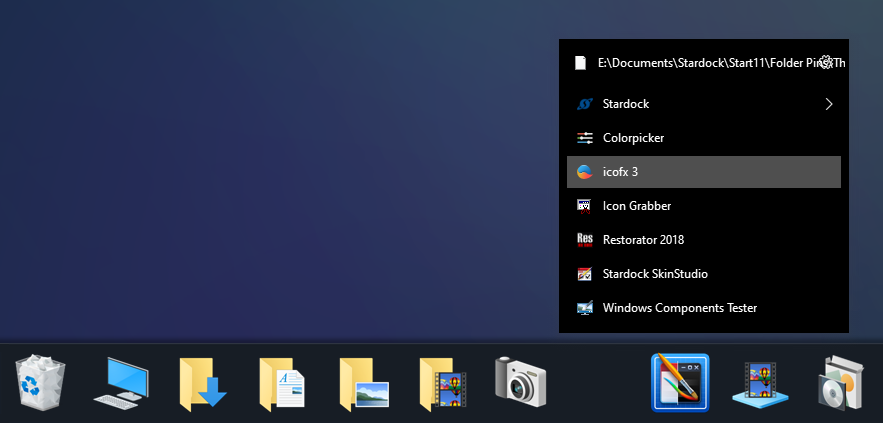
and add the folder you want, it does exactly what it pins to the taskbar, but opens from anywhere you pin it to. I have a folder where I save all these so I dont have to pin them to the taskbar as shown below. This opens a folder menu for my office folder.
target "C:\Program Files (x86)\Stardock\Start11\PinMenu.exe" "E:\Documents\Stardock\Start11\Folder Pins\Office"

But doing this method blocks me from having per folder menu settings. Only if they are pinned to the taskbar do they keep their settings. But if I launch that shortcut not pinned to the taskbar it just uses the setting across all of them.

Example shortcut added to a dock such as winstep workshelf


Reply #9 Top
Quoting SimplexDesigns, reply 4149511
Quoting Neil, reply 4149501
Quoting SimplexDesigns, reply 4149490

With V3, the new folder popup options are nice but I would like if we could have an option to hide this part of the menu like how it was in v2.

Also would be nice if each folder popup had their own options respected. If I select the grid option, all popups use the same option. (It only works if you have them pinned to the taskbar. If I create a desktop shortcut to put on a dock like objectdock or winstep, it just sets grid on everything.)

End of SimplexDesigns's quote

How are you accessing them from anywhere other than the taskbar?  The settings should be being saved per folder.

With regards to that header, the next update will have an autohide option you can pick (under view submenu) on each so you can decide if you want to see the header always or only if you mouseover it.

End of Neil's quote

If you create a windows shortcut that links to "C:\Program Files (x86)\Stardock\Start11\PinMenu.exe"

and add the folder you want, it does exactly what it pins to the taskbar, but opens from anywhere you pin it to. I have a folder where I save all these so I dont have to pin them to the taskbar as shown below. This opens a folder menu for my office folder.

target "C:\Program Files (x86)\Stardock\Start11\PinMenu.exe" "E:\Documents\Stardock\Start11\Folder Pins\Office"

But doing this method blocks me from having per folder menu settings. Only if they are pinned to the taskbar do they keep their settings. But if I launch that shortcut not pinned to the taskbar it just uses the setting across all of them.

End of SimplexDesigns's quote

What if you pin using Start11 to pin to the taskbar and then copy the shortcuts from %AppData%\Microsoft\Internet Explorer\Quick Launch\User Pinned\TaskBar to say your desktop?  Does it work then?


Reply #10 Top
Quoting Neil, reply 4149512
Quoting SimplexDesigns, reply 4149511
Quoting Neil, reply 4149501
Quoting SimplexDesigns, reply 4149490

With V3, the new folder popup options are nice but I would like if we could have an option to hide this part of the menu like how it was in v2.

Also would be nice if each folder popup had their own options respected. If I select the grid option, all popups use the same option. (It only works if you have them pinned to the taskbar. If I create a desktop shortcut to put on a dock like objectdock or winstep, it just sets grid on everything.)

End of SimplexDesigns's quote

How are you accessing them from anywhere other than the taskbar?  The settings should be being saved per folder.

With regards to that header, the next update will have an autohide option you can pick (under view submenu) on each so you can decide if you want to see the header always or only if you mouseover it.

End of Neil's quote

If you create a windows shortcut that links to "C:\Program Files (x86)\Stardock\Start11\PinMenu.exe"

and add the folder you want, it does exactly what it pins to the taskbar, but opens from anywhere you pin it to. I have a folder where I save all these so I dont have to pin them to the taskbar as shown below. This opens a folder menu for my office folder.

target "C:\Program Files (x86)\Stardock\Start11\PinMenu.exe" "E:\Documents\Stardock\Start11\Folder Pins\Office"

But doing this method blocks me from having per folder menu settings. Only if they are pinned to the taskbar do they keep their settings. But if I launch that shortcut not pinned to the taskbar it just uses the setting across all of them.

End of SimplexDesigns's quote

What if you pin using Start11 to pin to the taskbar and then copy the shortcuts from %AppData%\Microsoft\Internet Explorer\Quick Launch\User Pinned\TaskBar to say your desktop?  Does it work then?


End of Neil's quote

Pinned steam games to taskbar. I set the mode to grid mode. Copied the shortcut to the desktop and it goes to small icon mode while in the taskbar is grid mode. If I set the one on the desktop to grid mode, all others launched this way from the desktop are grid mode while the taskbar ones respect the options set.

Reply #11 Top
Quoting Neil, reply 4149512
Quoting SimplexDesigns, reply 4149511
Quoting Neil, reply 4149501
Quoting SimplexDesigns, reply 4149490

With V3, the new folder popup options are nice but I would like if we could have an option to hide this part of the menu like how it was in v2.

Also would be nice if each folder popup had their own options respected. If I select the grid option, all popups use the same option. (It only works if you have them pinned to the taskbar. If I create a desktop shortcut to put on a dock like objectdock or winstep, it just sets grid on everything.)

End of SimplexDesigns's quote

How are you accessing them from anywhere other than the taskbar?  The settings should be being saved per folder.

With regards to that header, the next update will have an autohide option you can pick (under view submenu) on each so you can decide if you want to see the header always or only if you mouseover it.

End of Neil's quote

If you create a windows shortcut that links to "C:\Program Files (x86)\Stardock\Start11\PinMenu.exe"

and add the folder you want, it does exactly what it pins to the taskbar, but opens from anywhere you pin it to. I have a folder where I save all these so I dont have to pin them to the taskbar as shown below. This opens a folder menu for my office folder.

target "C:\Program Files (x86)\Stardock\Start11\PinMenu.exe" "E:\Documents\Stardock\Start11\Folder Pins\Office"

But doing this method blocks me from having per folder menu settings. Only if they are pinned to the taskbar do they keep their settings. But if I launch that shortcut not pinned to the taskbar it just uses the setting across all of them.

End of SimplexDesigns's quote

What if you pin using Start11 to pin to the taskbar and then copy the shortcuts from %AppData%\Microsoft\Internet Explorer\Quick Launch\User Pinned\TaskBar to say your desktop?  Does it work then?


End of Neil's quote

I suspect what is launching isn't passing over the shortcut information to it.  The information is saved per shortcut.

Are you launching it from an explorer window or something else?


Reply #12 Top
Quoting Neil, reply 4149515

I suspect what is launching isn't passing over the shortcut information to it.  The information is saved per shortcut.

Are you launching it from an explorer window or something else?

End of Neil's quote

Just the desktop or object dock/winstep nexus work shelf.

I will stop posting here for now. I posted a separate thread so it does not clog up here.

https://forums.wincustomize.com/542812/start-11v3-folder-menus-issue/page/1#4149518

Reply #13 Top
Quoting c242, reply 4149500

So my deleted question finally answers. ;P :-" 

End of c242's quote

You caught us a bit early!

Reply #14 Top
Quoting bdsams, reply 4149517
Quoting c242, reply 4149500

So my deleted question finally answers. ;P :-" 

End of c242's quote

You caught us a bit early!

End of bdsams's quote

All good, I figured that. ;-)