
Hiding the start button on the secondary display doesn't consistently work

Windows Version Number: Windows 11 25H2
App Version: 2.81

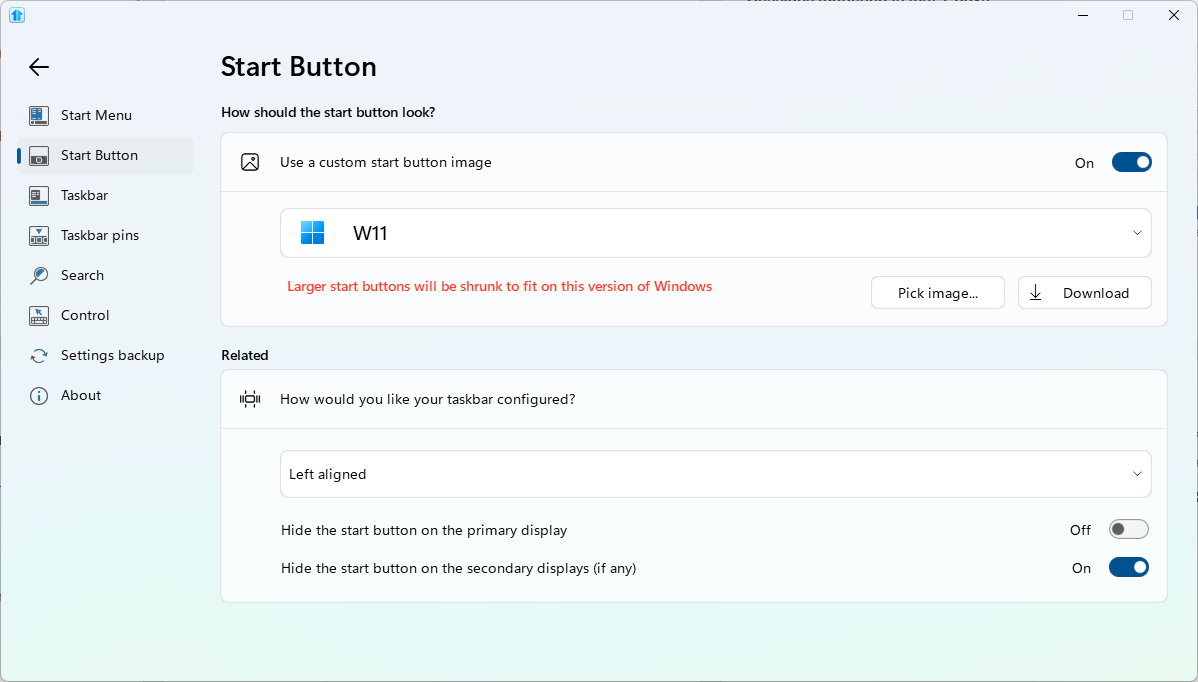
I have had Hide the start button on the secondary displays (if any) enabled for multiple Start11 builds now, and about 50% of the time my PC will boot up with the start icon on my second monitor. If I kill/restart Explorer and right-click on the taskbar it corrects itself. Is there a trick to getting this to work consistently? Maybe setting the Start11 service to Automatic (Delayed start)?
667 views 9 replies
Reply #1 Top

Hello,
Sorry to hear you are having issues. I can't reproduce your issue on my system. Do you have any other 3rd party application that also change your taskbar such as StartAllBack, DisplayFusion etc?

Thank you,
Basj,
Stardock Community Assistant.

Reply #2 Top
Quoting basj, reply 4147690

Hello,

Sorry to hear you are having issues. I can't reproduce your issue on my system. Do you have any other 3rd party application that also change your taskbar such as StartAllBack, DisplayFusion etc?


Thank you,

Basj,

Stardock Community Assistant.

End of basj's quote

Nope, this is the only app that touches the Start menu or taskbar.

Reply #3 Top

If you have not yet, Please try, uninstall Start11, reboot immediately (important), download latest version available in your account product download page: https://store.stardock.com/myaccount/products. Install it, reboot immediately again. Retest it and report back.

If the issue still happen, need to know your Windows 11 25H2 OS Build number.

Thank you,

Basj,
Stardock Community Assistant

Reply #4 Top
Quoting basj, reply 4147693

If you have not yet, Please try, uninstall Start11, reboot immediately (important), download latest version available in your account product download page: https://store.stardock.com/myaccount/products. Install it, reboot immediately again. Retest it and report back.

If the issue still happen, need to know your Windows 11 25H2 OS Build number.

Thank you,


Basj,

Stardock Community Assistant

End of basj's quote

I actually did just that when I installed v2.81, as I had other issues in 2.8.

Reply #5 Top
Quoting basj, reply 4147693

If the issue still happen, need to know your Windows 11 25H2 OS Build number.

End of basj's quote

Still to know this information.

Thank you,

Basj,
Stardock Community Assistant

Reply #7 Top
Quoting NTP66, reply 4147718

Build 26200.9457

End of NTP66's quote

Same version as on my system. I can't reproduce it, moving forward, I have forwarded your problem/question to Stardock Support Team for their assistance. Please keep an eye on this thread for any updates. We appreciate your feedback and patience. 

Added: Do you see different behavior if you turn off Custom Start button? Also, Start11 Enhance taskbar turn on or off? 

Thank you,
Basj,
Stardock Community Assistant

Reply #8 Top

Enhanced taskbar is enabled, yes. And yes, the problem exists even if I disable the custom Start button.

Reply #9 Top

Noted and please wait for Support to respond to this one.

Thank you,

Basj,
Stardock Community Assistant