App Usage: SolidWorks Design Table (embedded Excel) fails to open while Groupy 2.31 is loaded - Excluding EXCEL.EXE does not prevent the hook DLL injection
OLE in-place activation of the embedded Excel server fails (server starts then exits cleanly) only when Groupy was started at logon; excluding EXCEL.EXE from grouping does not stop the hook DLL injection.
 Stardock Forums
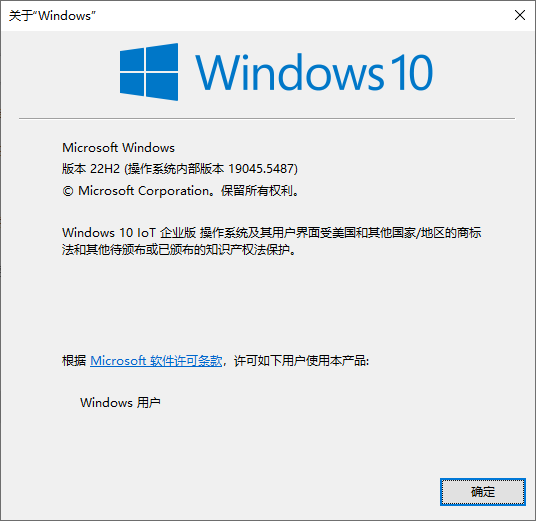
Windows Version Number: Windows 10 IoT Enterprise 22H2 (build 19045.5487)
App Version: Groupy 2.31 (2.3.1.1)
1. Exact version of Windows / application
- Windows: Windows 10 IoT Enterprise 22H2, Version 10.0.19045, Build 19045.5487 (ReleaseId 2009), 64-bit. Winver screenshot below (IMAGE 1). Session type: interactive Remote Desktop (RDP) session, single interactive user. OS display language: Chinese (zh-CN), which is why the dialogs in the screenshots are in Chinese.
- Groupy: 2.31, file version 2.3.1.1 - this is the current public release (released 2026-03-25; installed here from Groupy2_Setup.exe dated 2026-03-31). Install folder: C:\Program Files (x86)\Stardock\Groupy2\
- Component versions on this machine (they are not all the same build):
Groupy_64.dll / Groupy_32.dll        2.3.1.0
GroupyCtrl.exe                       2.3.1.0
GroupyConfig.exe                     2.3.1.1
GroupyHelp32.exe / GroupyHelp64.exe  1.4.0.0
GroupySrv.exe / GroupyCore.exe       2.1.5.0
- Service: "Groupy" = GroupySrv.exe, LocalSystem, Automatic, Running.
- SOLIDWORKS: 2022 SP5.0, file version 30.5.0.0049 - C:\Program Files\SOLIDWORKS Corp\SOLIDWORKS\SLDWORKS.exe
- Excel: Microsoft 365 Apps for enterprise (O365ProPlusRetail), 64-bit, 16.0.20326.20144 - C:\Program Files\Microsoft Office\Root\Office16\EXCEL.EXE
- Affected feature: SolidWorks Design Table - an embedded Excel worksheet that SolidWorks creates and edits through OLE in-place activation (it starts EXCEL.EXE -Embedding).
2. New or existing issue
Existing issue, reproducible on the current public release. We run Groupy 2.31 (file version 2.3.1.1, released 2026-03-25) and there is nothing newer to test against - if a later build already addresses this, please point us at it.
We do not know in which version this started. We cannot tie the onset to a specific Windows, Office or SOLIDWORKS update - we only know the problem is present on the latest release. What we can state precisely is which Groupy states do and do not produce the failure (sections 3 and 6). If it helps, we are happy to install older builds (e.g. 2.30) and test to pin down where the regression appeared.
3. How to reproduce
- Restart Windows and log in normally - Groupy 2.31 is started automatically at logon (its service is Automatic, and the session components load at logon).
- Start SolidWorks 2022 and open any part.
- Insert > Tables > Design Table, then choose to create a blank table.
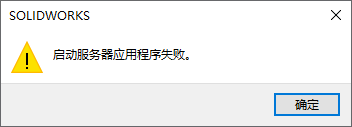
Result: SolidWorks shows the dialog "启动服务器应用程序失败" / "Failed to start server application" (IMAGE 2). No worksheet is ever inserted. - Alternative path: open a part that already contains a Design Table and choose to edit it.
Result: an Excel window appears for a fraction of a second and closes immediately; the table does not open. No error dialog, no crash. - Now run:
"C:\Program Files (x86)\Stardock\Groupy2\GroupyCtrl.exe" unload
Result: both (3) and (4) work normally, and Excel does not need to be opened in advance. - Restart Windows again (Groupy auto-starts at logon).
Result: the failure is back, 100% of the time.
Nothing is written to the Windows Application event log and no Excel crash is recorded - the embedded server process simply starts and goes away.
4. Images / video
- IMAGE 1: Winver - exact Windows version and build.
- IMAGE 2: the SolidWorks error dialog.
- Available on request: the full "tasklist /m groupy_64.dll" output, a sample SOLIDWORKS part containing a Design Table, a registry export of the Groupy settings/Exclusions list, SasLog.txt, and a ProcMon trace of the failing OLE activation.
5. Crash dumps
Not applicable here. This is not a crash: the OLE server process starts and exits cleanly, nothing faults, so the WinDBG postmortem procedure would not produce a dump. If you want a dump or an ETW/ProcMon trace of the activation attempt captured in a specific way, tell us exactly what to capture and we will provide it.
----- technical annex (6-10) -----
6. Proof that Groupy is the cause (isolation testing)
State of the machine -> behaviour, everything else unchanged:
- Groupy loaded (auto-started at logon): Design Table creation and editing fail. 100% reproducible across restarts.
- Groupy unloaded ("GroupyCtrl.exe unload"): the problem disappears immediately and completely - new and existing Design Tables both work, and Excel does not need to be opened in advance. 100% repeatable.
- Groupy re-loaded during the same session (see section 9 - the config UI offers to start Groupy again): the Design Table still works and does NOT fail.
- Next Windows restart, Groupy auto-starts at logon again: the failure is back, 100% of the time.
Control tests:
- Word (WINWORD.EXE) inserting a plain embedded Excel object: works normally, no flash.
- SolidWorks inserting a plain embedded Excel object: works normally.
- Only the Design Table path fails - i.e. exactly the path that activates Excel as an in-place OLE server (EXCEL.EXE -Embedding).
- All Excel add-ins disabled: no change (tested before writing this report).
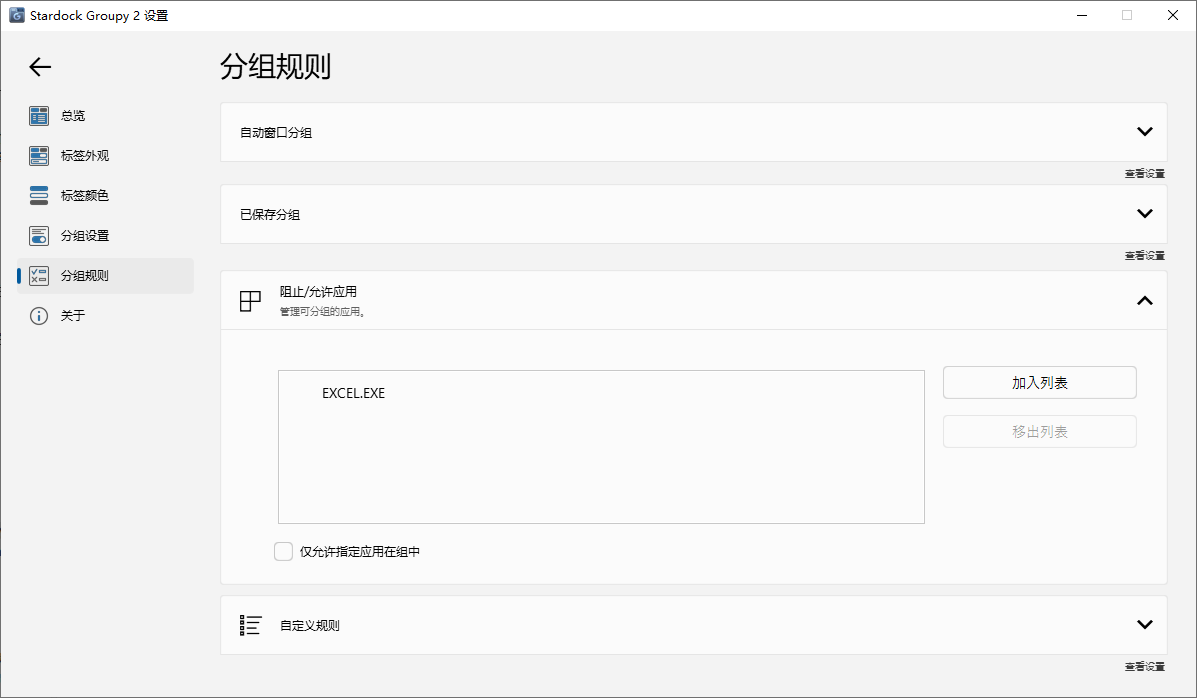
- Adding EXCEL.EXE to the Exclusions list and switching off every Groupy feature that can be switched off in the config UI: no difference.
This isolates the failure to Groupy's session-wide window hook, and not to SolidWorks, Excel, COM registration, DCOM permissions, AppCompat flags or 32/64-bit mismatches.
7. Core finding: the Exclusions list does not prevent hook injection
EXCEL.EXE is already in the Exclusions list and it is still hooked. The Exclusions list only controls whether Groupy draws a tab / groups the window; it does not stop groupy_64.dll from being loaded into the process.
Evidence 1 - the exclusion is configured, and the process is still hooked:
tasklist /m groupy_64.dll
-> 117 processes have groupy_64.dll loaded, including every EXCEL.EXE on the
   machine (including the -Embedding instance started by SolidWorks),
   SLDWORKS.exe, plus dwm.exe, explorer.exe, svchost.exe, sihost.exe and
   ctfmon.exe, which have nothing to do with tab grouping.
Evidence 2 - the hook is session-wide and not limited to applications Groupy actually groups: those processes are hooked even though Groupy is only being used for Explorer/Notepad style grouping.
So "just exclude excel.exe" cannot work as a workaround - the DLL is injected regardless of the Exclusions list. That is why the exclusion appears to do nothing.
8. Why we think this breaks the Design Table
SolidWorks asks OLE to activate Excel as an in-place server (EXCEL.EXE -Embedding). While that server process is initialising, Groupy's hook is injected into it and the process has to complete Groupy's named-pipe handshake. The OLE activation handshake then times out, so the client reports "Failed to start server application"; for an existing embedded table the server window is torn down immediately after it is created. Removing the hook (Groupy unload) removes the failure.
One observation that may help you locate it: the failure requires Groupy to have been started on the logon/boot path. If Groupy is restarted during a running session (section 9), the Design Table keeps working until the next restart. That suggests the problem is in the hook / pipe set-up performed on the logon path, rather than in the grouping feature itself.
Strings visible in the shipping binaries that match this behaviour include: SetWindowsHookExW, SetWinEventHook, UnhookWindowsHookEx, CallNextHookEx, GroupyListen%d, GP_LISTENER, InclusionListMode, and the build path Q:\Groupy 2\modified uxhook - Groupy\Release\uxhook.pdb.
9. Secondary observations: unload / reload, and the logon dependency
- "GroupyCtrl.exe unload" works and reliably removes the failure.
- Running GroupyCtrl.exe again does NOT bring Groupy back: GroupyHelp32.exe / GroupyHelp64.exe are not re-spawned and the SAS module is not re-initialised in explorer.exe.
- We found no documented command to load/reload Groupy. Reloading is possible through the UI: after unloading, opening the Groupy configuration window shows a prompt that Groupy is not currently running and asks whether to start it; accepting brings Groupy back and tabs reappear.
- After that in-session reload, however, the Design Table still works and does not fail. The failure only returns after a Windows restart, where Groupy is started automatically at logon (100% reproducible). So the failure tracks Groupy's logon start-up, not simply the presence of active Groupy tabs in the session.
- Evidence for the unload side, C:\Users\<user>\AppData\Local\Stardock\Groupy2\SasLog.txt:
[2026-09-17T11:37:18] Info : Shutdown SAS in module 'C:\Windows\Explorer.EXE'
10. Requests
- Is there a supported way to stop Groupy from injecting its hook DLL into a specific process (by file name or full path)? If the Exclusions list is supposed to do that, please document the correct configuration - because it currently does not.
- If there is no such option, please add an "exclude from injection (not just from grouping)" option. Any application that hosts Office as an in-place OLE server (Excel/Word as embedded servers) is affected by the same mechanism.
- Please look at the compatibility between uxhook and OLE in-place server activation (EXCEL.EXE -Embedding), specifically at the pipe handshake timing during server start-up.
- Is the difference between a logon start and an in-session reload (section 9) expected? It may be the key to reproducing and fixing this.
- Please provide a supported, scriptable way to load/reload Groupy after "unload", without restarting the service or logging off (the UI prompt works, but cannot be scripted).
Thank you - happy to run any test build or provide any logs you need.