Firefox 3 Release & Stardock Site Compatibility
Jul 30, 2008 12:59

Firefox 3.0 goes final and is scheduled for release on Tuesday, June 17th.

There are currently known incompatibilities between Firefox 3 and many of our sites and forums. For the most part, the sites function properly, but have formatting issues. A specific example are the login & password fields to log into these forums. In Firefox 3, instead of both being on the same line, they are stacked vertically.

We will be addressing these visual issues in time. Please do NOT post threads on the forums pointing out Firefox 3 site issues. They will be deleted. We are aware of the problems and will work as quickly as we can to resolve them.

Until posted otherwise, the only version of Firefox our sites support at the moment is Firefox 2.

Widget Request

By Posted April 29, 2008 11:53:43
ok, if any of you expert widget makers out there would be willing to make me a very specific widget, let me know.  What I'm looking for is this...

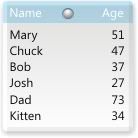
An age widget, which simply uses some kind of script to calculate someone's age based on me entering their date of birth or something like that, and displays just their name and age.  And the age would change automatically when the person has a birthday.  Is that possible?  I'm sure one of you amazing widgeteers out there can do this.  I've got alot of cousings and nephews and uncles who's age I can never remember.  And rather than having to look up birthdays all the time, then figure out their age from that, I'd like my computer to do it for me...   Ok, now here's the annoying part.  I want it to be pretty simple looking... just a basic white background, with a little shadowing and bevelling on the edges, but not much.  The width needs to be 138, (the width of all my other widgets I use) and the height of course would/could expand depending on how many names are on the list... And 8 pt Seogue for the font, in black.  And just a simple little button that brings up a dialog to add names and birthdates...

I know I'm being kind of annoying and specific, but hey, if I'm going to request a widget, I might as well take all the guess work out of it, right? 

Below is a mock up that I came up with...

Thanks so much ahead of time if anyone decides to give this a go...

+8 Karma 51 Replies 6 Referrals
May 13, 2008 19:49:05
WOW nice Sir  
May 13, 2008 19:50:36
double post   
May 13, 2008 20:57:25
Wow, you really took this baby off the porch and raised it... but I digress... I really appreciate all the work you're putting into it. It's looking great, and it's FAR more feature rich than I ever hoped for. Thanks again!
Sign Up or Login and this ad disappears!
There are many great features available to you once you register. Sign Up for a free account and browse the forums without ads.
May 21, 2008 00:28:47
and it's FAR more feature rich than I ever hoped for


Yeah, I'm beginning to regret adding so many features...it's not the features that are the issue it's making sure the little things co-exist.

It's getting there.
- Columns are now sizable,
- you can hide the age/birthday columns
- record highlight(finished)
- record selection/deletion.(finished)
- option to run from registry or settings file. (finished)

May 21, 2008 09:20:33
I would love to look over this code when its all done to see how your doing the row/col thing its something i have always struggled with in DX.

This is so cool, I bow to your awesomeness.
May 21, 2008 14:50:59
wowwee. Looking better and better every day. Can't wait to have it...
May 21, 2008 15:31:01
Thanks guys.

I would love to look over this code when its all done to see how your doing the row/col thing its something i have always struggled with in DX.


I hear you. Once I got multidimensional array's down part it became easier. Looking at some of Skarns' objects is where I learned. Basically you just calculate the position by dividing the object height by the number of variables(rows) in the array.

It's going to be released as a widget;so, the code will be viewable but, I think it's still easier to grasp from Skarn's work.
May 21, 2008 15:50:53
I have used a lot of "datasets" as they work like databases and i do a lot of web design so, it all links together. will have to check it out.
May 21, 2008 17:04:27
Cool. Looking for the finished product.
May 21, 2008 21:52:12
Patience young jedi!

There's 57 functions/sub procedures and I haven't added the alarm feature, sounds, skinning or font themes yet! Those should go fairly quick it's the minutiae of sizing, hiding, etc. that takes the most time.
May 21, 2008 22:39:03
My goodness!

This is looking awesome, SirS. It's amazing the amount of effort you've put into this. Good work!      
May 30, 2008 13:52:01
I've affectionately codenamed this "Big Daddy" due to the script size.

Anyways, I've put aside making this skinnable for the time being due to other commitments.
It should be easy enough to skin on your own without touching the script.

Just the alarm function and a better basic skin & we're good to go...at least until you guys find what I missed!

May 30, 2008 16:21:37
Looks great
May 30, 2008 16:42:20
I had no idea of how much work went into these things. "Verrry Interesting"!
May 30, 2008 19:10:32
Oops, mislabeled open and closed...sort of obvious though.

I had no idea of how much work went into these things. "Verrry Interesting"!


Some of them can go really fast and others don't. Just like when you are putting a skin together and tweaking some of the finner items takes time the same goes with scripting various functions together.
May 30, 2008 23:48:42
glad to see you haven't given up on it. Looking good!
June 10, 2008 21:24:02
Take it for a test run.

Head these warnings or perish in a pit of fire.

When you first run, you'll get a message box asking for the folder and the data file.
I've included one that has 25 names/birthdays. Browse to the folder in the folder dialog
and type "birthday" in the file name.
- Uncheck Use settings file if you want to use the registry to store all of the settings
- Make sure to check the "Use Existing file" since there is one provided
- The widget will close and you'll have to restart it.
- Two of the default font settings for some reason don't show up, so you'll have to edit the Title and Page Status Text settings
- Drag the bottom sizer to resize the height and hit the toggle button (bottom right corner) to shrink/grow the widget.
- Page Navigation buttons are in the header and footer at the right side

Things to know
- I'm not sure if the sort function will work for everyone as it uses ado.
- The cleanup selection in the menu generates a vbscript file in the directory and will remove all entries created. This is needed even if you use a settings file.


BirthdayTracker@Box.net
June 11, 2008 00:08:41
well, unfortunately, this widget is not working for me in a number of ways. the resize won't work... the only way I could close it was with ctrl/alt/del and end it there. and when I move one part of the window, both parts move together. I can't make them work independently. And most importantly, I get no menu on right click at all. Has anyone else tried it out? Are you getting any of these problems too?
June 11, 2008 10:54:14
Good to know. Looking for usability issues like this because of the animation/paging features.

The normal right click menu should a appear wherever the "move" cursor is but, you should also have access to it in the system tray.

The widget menu is a a left click menu at the top left just above the name title and your cursor will change to a hand when you hover it plus show a tooltip called "menu".

Want to know more about the resize issue. There are only two sizers, one on the right side (left-right arrow) and one on the bottom (up-down arrow). The bottom right corner (toggle button) has no resizing and I know the button is too close to the page down button. If you drag the bottom sizer beyond the list it should snapback to the bottom of the list.

Did you try the column sort yet? Click on the Name or Age Column Title.

It shouldn't matter but, what version of DesktopX are you using?

PS. I know there needs to be documentation but, I'm using you guys as guinea pigs because the majority of people ignore the documentation.
June 11, 2008 11:26:29
Using DX 3.50.060 and XP SP2

First time I loaded it up it said Loading... and the alarm kept going off and it resized itself a few times lengthwise. I let it go for a few minutes to see if it would fix itself and it didn't.

Second time it stayed the small box and still said Loading... and had the alarm going off. When trying to click the menu area a few different times it would show the hand and say menu about 50% of the time and when I clicked it it made the sound effect for the menu but didn't show a menu.

Third time had same results as the second.

June 11, 2008 12:43:10
Well, as far as the resizing, when I hover over the right/bottom I would get the resizing cursor, but dragging simply didn't do anything.

As far as trying the sort feature, the widget opened at a height of which I only could see the borders, not even the name/age columns. That's why the lack of resizing kind of shut me down completely...

I could get no right click menu of any kind, whether it be the normal one, or the widget one, or whatever. Right clicking anywhere on the widget did nothing.

I'm running Desktop X version 3.50.060

Hope I answered your questions. I'm not on my computer right now, but I'll open it and try to mess with it some more later today.
June 11, 2008 17:17:13
Thanks for trying out guys.

This should fix some of the issues and I'm probably going to do away with the widget close when you first run it. It was suppose to fix the text issue.

zakai, I'm wondering if the menu issue isn't the button itself. It may be too small and perhaps should be sent over to the upper left corner. The other thing with the menu is it is quite large and takes a few seconds to build itself.


Get the hot potato here
June 11, 2008 19:03:53
Well I tried the new version and it's loading the actual widget easier and doesn't stay saying Loading... anymore and it didn't resize itself like last time. I was able to resize it myself in both directions but when I resized the inner colums a couple of them disappeared on me. The menu button shows up fine on mouseover but when I click it I still get no result. I tried clicking and holding it and tried clicking it and then not moving the mouse. Neither worked. I get the click sound effect and I get a small spike in cpu usage as if it is trying to do something but I never actually get the menu.

June 11, 2008 20:07:08
Really appreciating the feedback.

Haven't been able to recreate the menu issue but, will see if I can streamline it somehow.
There are a lot of statements in it.

As for the columns did you get message box warning before they disappeared? I know what the main issue is with the columns and was trying to save a bunch of extra settings/variables.
Will have a work at those tomorrow.
June 11, 2008 21:33:30
As for the columns did you get message box warning before they disappeared?


No.

Stardock Forums v1.5.3099.12923
© 1995-2008 Stardock Corporation. All rights reserved.
All times are EST. The time is now 23:37:48
Server Load Time: 00:00:00   Page Render Time: