Firefox 3 Release & Stardock Site Compatibility
Jul 30, 2008 12:59

Firefox 3.0 goes final and is scheduled for release on Tuesday, June 17th.

There are currently known incompatibilities between Firefox 3 and many of our sites and forums. For the most part, the sites function properly, but have formatting issues. A specific example are the login & password fields to log into these forums. In Firefox 3, instead of both being on the same line, they are stacked vertically.

We will be addressing these visual issues in time. Please do NOT post threads on the forums pointing out Firefox 3 site issues. They will be deleted. We are aware of the problems and will work as quickly as we can to resolve them.

Until posted otherwise, the only version of Firefox our sites support at the moment is Firefox 2.

DX Tutorial #1: Resizing an object

RomanDA's DX Tutorial Series

By Posted April 14, 2006 15:58:17
RomanDA's DesktopX Tutorials:
My goal is to make a set of tutorials for DesktopX.  If you have ideas on what you would like to see, please email me at DXTutorials@RomanDA.org

DesktopX Object Resizer:
Lets try this one again... Resizing an object in DX "should" be easy but it always seems to take a lot more effort then it should.
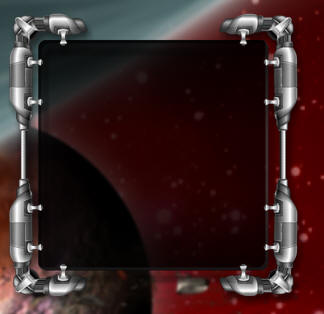

This is the "Background item" in this case its called:
GalCivII-MenuBar-Graphics-Back


This will resize when you drag this "resizer" object. ->


We will use the resizer to drag around and make the master object resize.
This is the only way i have found to make an object resize.

The resizer object sites on-top of the master item.
The trick here is to cut part of the master object out and use it for the resizer.

I pulled a small part of the bottom right and saved it back out as "resizer".

When you drag the resizer, it changes its x/y position. 
As long as you know the position of the resizer in relation to the master object,
the rest of this will work pretty well.

In this case the resizer sits 39 pixels from the bot and 35 pixels from the right.

---NOTE ---
Do not put both of these objects into the same GROUP it will not work!


The Resizer object has its "Parent/Owner" set to:
 GalCivII-MenuBar-Graphics-Back

It is NOT set as a CHILD object, that will not work.

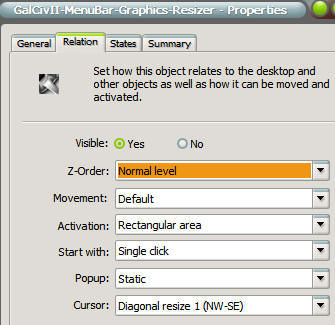
To make it show the "resize arrows" you have to
make changes to the Relation as you see in this image.


Check the "Cursor" settings.

 
Lets look at the script.
  This is ALL inside the "resizer" there is nothing in the master obj.

First lets assign some vars so we can make this work easier on other object.

 
Dim Min_width, Min_height, ObTop, ObLeft, masterobj
MasterObj = "GalCivII-MenuBar-Graphics-Back" 
'- Name of the master object
Min_width = 300  'Minimum width of the master object)
Min_height = 300
'Minimum height of the master object)
ObTop = 39      
'Offset from Bottom for Resizer
ObLeft = 35     
'Offset from Right for Resizer

This part moves the resizer (it was easier to make it a sub so I could just CALL it when I needed it)
 
Sub MoveMe
     object.left = desktopx.Object(MasterObj).width - ObLeft
     object.top = desktopx.Object(MasterObj).height - ObTop
End Sub

This is called when the object is drawn so it puts it in the right place every time.

Sub Object_OnScriptEnter
     Call MoveMe
End Sub

This is the resizing, it uses "OnDrag" to reposition the resizer object, then make the master object change width/height.

Sub Object_OnDrag(x,y,newX,newY)
     newh = newY + ObTop
'Take the newY plus the top offset to get the width
     neww = newX + ObLeft
'Take the newX plus the left offset to get the height
     If neww > Min_width Then
'if the new size is greater than the min width then resize it (or stop it at the min size)
          DesktopX.Object(MasterObj).width = neww
     Else
          DesktopX.Object(MasterObj).width = Min_width
     End If

     If newh > Min_height Then
'if the new size is greater than the min height then resize it (or stop it at the min size)
          DesktopX.Object(MasterObj).height = newh
     Else
          DesktopX.Object(MasterObj).height = Min_height
     End If
     Call MoveMe
'move the resizer so its always in the right spot
End Sub

The next step would be to "hide" the inside objects and then unhide them after the resize was done. (might update this if i get a min).

CLICK HERE to download the working version of this and see how it works.

Enjoy,
RomanDA
AKA: David A. Roman
http://romanda.wincustomize.com
http://www.romanda.org
DXTutorials@RomanDA.org
+43 Karma 10 Replies 28 Referrals
April 14, 2006 16:04:28
Very, very nice! Thanks!

Posted via WinCustomize Browser/Stardock Central
April 14, 2006 16:06:47
Can't edit posts stil.

It looks great, but when I go to resize, it grows a bit, then shrinks to original size and moves (as if drug).


Posted via WinCustomize Browser/Stardock Central
April 14, 2006 16:13:30
Thats fixed.. see the NOTE.


Also, Thomas had an idea of putting a transparent box for the resizer so it wouldnt show the object moving when you resized it fast.

Will update this when i can.
Sign Up or Login and this ad disappears!
There are many great features available to you once you register. Sign Up for a free account and browse the forums without ads.
April 14, 2006 20:24:39
looks very interesting.

can somebody email me some smarts?
i really want to understand this stuff.
April 14, 2006 20:54:30
Thomas had an idea of putting a transparent box for the resizer so it wouldnt show the object moving when you resized it fast.


was going to suggest this myself - I find using transparent objects very useful for a multitude of purposes

great little tutorial - showing people how do-able dx scripting really is
April 15, 2006 19:24:47
I will post this as a widget when i get a few mins.
I want to include how to save the state after you size/move it as well.

Want to try and make it as generic as possible, even include some objects inside to show how to move them and resize them as well.
April 15, 2006 19:26:48
I will post this as a widget when i get a few mins.
I want to include how to save the state after you size/move it as well.

Want to try and make it as generic as possible, even include some objects inside to show how to move them and resize them as well.
April 15, 2006 19:55:14
Excellent technique and tutorial! thanks!
March 3, 2007 06:28:10
Hmmm... In your downloadable example, when you resize, the top left corner of the main graphic stays static and it resizes out in the other three directions, but when i tried my own example, when you resize, it resizes out from the top left hand corner also, which doesnt look as cool. Ive compared the two as closely as i can and i cant see why this is happening, anyone know why perhaps? They are not in the same group.

This is a deadly script by the way! RomanDA is the scripting DAddy .

Ronan H
March 6, 2007 20:47:03
Ronan,

check the SUMMARY tab look at the top 2 lines, LEFT/TOP, if they say anything else.. like maybe CENTER/RIGHT or BOTTOM/CENTER the position will change based on that. These are the "anchor" points in the widget.

As for:
RomanDA is the scripting DAddy


You need to look at Vad_M's stuff.. makes me look like a noob
Stardock Forums v1.5.3099.12923
© 1995-2008 Stardock Corporation. All rights reserved.
All times are EST. The time is now 21:23:20
Server Load Time: 00:00:00.0021110   Page Render Time: